
For right-to-left books
Booklets that open right to left.
Most booklet tools assume a book opens on the left. Foldio has a right-to-left mode that puts the spine on the right and orders every sheet for RTL reading, for books in Arabic, Hebrew, Persian, Urdu or any right-to-left language.
- 01
Spine on the right
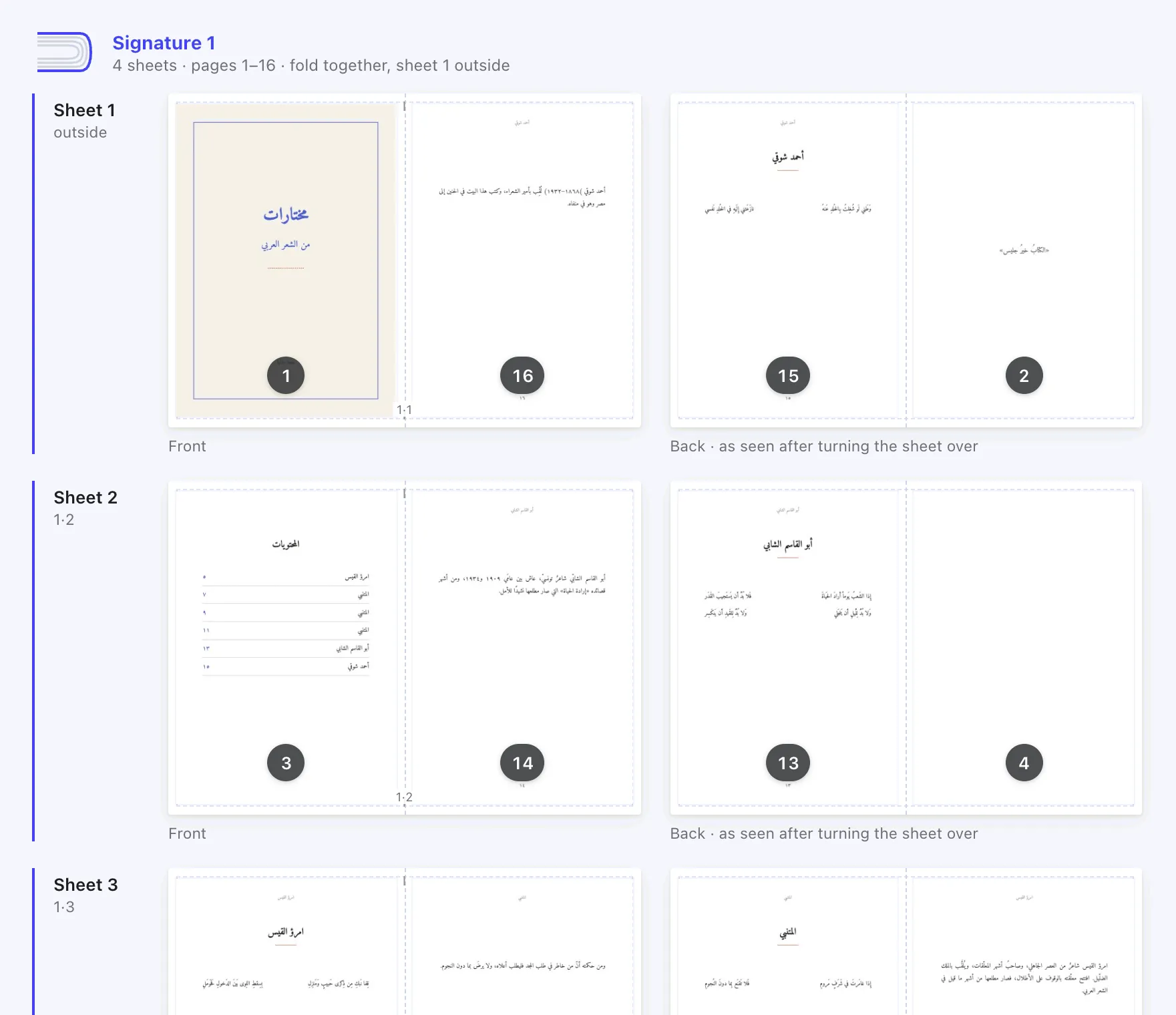
Choose right to left and the whole book mirrors, from the sheet layout to the 3D preview.
- 02
Every sheet in RTL order
On the outer sheet of a 16-page signature, page 1 sits left of the fold and page 16 right. Foldio works this out for every sheet.
- 03
Arabic in the editor
Retype lines, add text boxes, headers and page numbers in Arabic, with letters joined correctly and Arabic-Indic digits.
- 04
Mixed languages
Arabic and English in the same line stay in the right order.
How to
An RTL book in four steps.
- 01
Export your PDF in reading order
Page 1 of the PDF should be the first page of the book (the front cover side for a right-to-left book).
- 02
Choose “Right to left”
In Foldio’s layout panel, set the reading direction to right to left. The spine moves to the right.
- 03
Check the sheets and the book
The Sheets view shows each sheet mirrored, and the Book view opens and turns like a right-to-left book.
- 04
Print, fold and bind
Print double-sided on the short edge at 100%, then fold and bind with the spine on the right.
14 days free
Try everything in Pro, free for 14 days.
No card needed and nothing to cancel. When the trial ends you go back to Free and keep every book you made.
Questions
Good to know.
Does right-to-left mode change my PDF?
No. Your PDF stays as it is. Foldio only changes where each page goes on the printed sheets and which side the spine is on.
Can I type Hebrew in the editor?
The editor’s fonts cover Latin and Arabic script today, including Persian and Urdu letters, so Hebrew text may not display. Right-to-left imposition works for PDFs in any language.
Can page numbers use Arabic-Indic digits?
Yes. Book-wide page numbers can use Latin (123) or Arabic-Indic (١٢٣) digits.
Is the app available in Arabic?
Yes. Choose العربية at the top of the screen and the whole interface switches to Arabic, right to left. This site is in Arabic too, at foldio.pro/ar/.
Foldio is also for